일단, 결론부터 이야기하자면 현재로서는 제목처럼 coderabbit cli를 WSL에서 사용할 수 없다. (2026/02/11 확인)
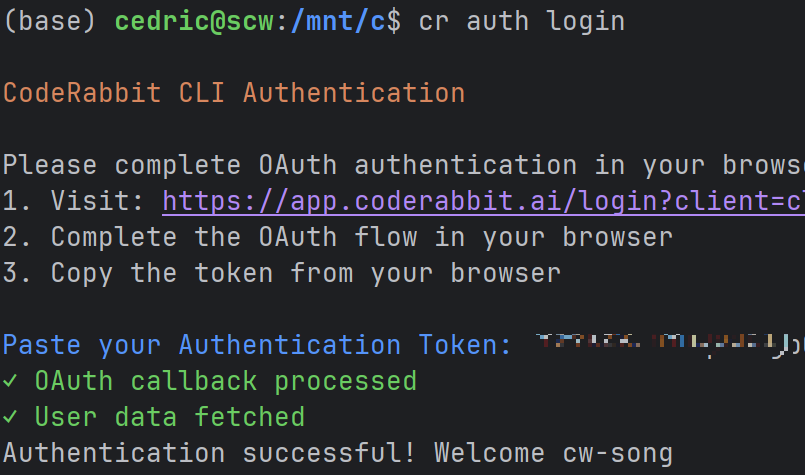
우선 인증 절차부터 잘안되는데, 그래도 우야무야 인증까지는 넘어간 사례를 공유하려고 글을 써본다.
1. Authentication failed: Failed to exchange authorization code: Internala server error. Could not get access and refresh token.
Internala server error
=> 다시 시도 한다.
2. Authentication failed: unable to store credentials in secured storage with error: Error [ERR_SECRETS_PLATFORM_ERROR]: libsecret not available
ERR_SECRETS_PLATFORM_ERROR
=> 관련 도구들이 설치되지 않아서 발생한 오류이니 아래의 커맨드를 실행하여 설치를 해준다.
> sudo apt update && sudo apt install -y libsecret-1-0 libsecret-tools gnome-keyring dbus-x11
3. Authentication failed: unable to store credentials in secured storage with error: Error [ERR_SECRETS_PLATFORM_ERROR]: Could not connect: No such file or directory (code: 1)
ERR_SECRETS_PLATFORM_ERROR
=> 기존 keyring 상태 초기화
> pkill -f gnome-keyring-daemon || true
> rm -rf ~/.local/share/keyrings
> rm -rf ~/.cache/keyring*
> rm -rf ~/.config/keyring*
=> 깨끗한 DBus 세션에서 keyring bootstrap을 시작해준다.
> dbus-run-session -- bash
위의 사례들을 겪으면 마침내 인증에 성공한다.
Authentication successful!
물론, 앞서 이야기 했듯 현재는 review 커맨드 이후 다시 동작하지 않는다.
아무래도 정말 리눅스 환경이 아닌 WSL 로 우분투를 실행하는 것이기에 다른점이 있는 것 같다.
CLion에서 터미널로 WSL을 띄워서 사용하려고 했는데 아직은 시기상조였나보다. (2026/02/11 확인)